
In the modern business landscape — where teams work remotely and collaboration is an absolute must — efficient project management is key to ongoing success. With 22% of the American workforce (that’s nearly 33 million employees) working remotely, using actual vision boards for project management and collaboration is not always an option.
Thankfully, there are other tools that your team can use for managing projects, even and especially when you have team members who are across the globe.
Whether you’re planning for an extravagant company event or your usual client meeting, there is a simple tool you can rely on to help you get your projects off the ground. Trello is a simple and easy to use tool that can provide you with all the organization capabilities of a planner while having the flexibility of a virtual corkboard.
With over 25 million users worldwide, it’s one of the most popular productivity and project management applications on the market today, and there’s no surprise why.
In this comprehensive guide, we’ll give you a rundown of the benefits and use cases of the project management software Trello. We’ll explore how you can utilize the tool and maximize Trello for effective project management and better overall workflow.
What is Trello?
Trello is a visual project management and collaboration platform designed to help teams organize work, coordinate responsibilities, and track progress in a clear, intuitive way. It is built around the concept of digital boards that represent projects or workflows, making it easy to see what needs to be done, who is working on what, and how tasks are progressing at any given moment.
Unlike traditional project management tools that can feel rigid or complicated, Trello emphasizes flexibility and simplicity with its advanced features. Teams can structure Trello boards to match their existing workflows, be it for project development, campaign planning, operations oversight, recruitment pipelines, or client service delivery. Because of this adaptability, Trello works equally well for small task groups and large cross-functional departments.
At its core, Trello consists of three main components:
- Trello Boards represent a project, department, or ongoing workflow.
- Trello Lists organize work into stages or categories, showing a project’s progression.
- Trello Cards represent individual tasks or deliverables, containing details such as instructions, due dates, attachments, comments, labels, and assigned team members.
This visual structure allows teams to grasp project status at a glance. Instead of digging through emails, searching through chat history, or asking repeatedly for updates, everyone can see where work stands simply by opening the board. All it takes is one Trello account, and you can utilize this project management tool for either a personal project, future projects, or monitoring task status on your existing workflows.
Much like other project management tools and kanban boards, Trello can be used to:
- plan and schedule work
- assign tasks and track ownership
- store project files and reference materials
- encourage accountability and transparency
- maintain alignment across departments and remote teams
And because Trello works in real-time, updates happen instantly — meaning decisions are faster, bottlenecks are easier to catch, and projects stay on track without constant check-ins or status meetings.
Why choose Trello for project management?
By using Trello, you can quickly and easily plot daily and monthly tasks. You also have the option to create boards and checklists which can be shared with your entire team for collaborative work. At a glance, you can even see the progress you’ve made and all the tasks you have left. Here are some of the key reasons why Trello is ideal for managing the end-to-end project management process:
- Trello provides clear visibility across projects.
Trello gives teams a shared, real-time view of every task and project stage. Instead of relying on scattered updates, email threads, or repeated follow-ups, progress is visible on the board at a glance. This makes it easier for leaders to monitor timelines and for team members to understand priorities without needing constant clarification.
- Trello boards help with transparency and accountability.
Each task in Trello can be assigned to specific team members, complete with deadlines, checklists, and attached files. This eliminates confusion over “who’s doing what,” helps prevent duplicated work, and promotes personal accountability throughout the workflow.
- Trello is flexible enough to match any workflow.
Unlike rigid project management platforms, Trello adapts to the processes your organization already follows. Whether you follow agile methods, structured approval flows, or continuous operational cycles, you can design Trello boards that reflect those exact workflows. The system works with (and for) you — not against you.
- Trello scales easily as your teams and projects grow.
Trello can support small teams working on focused tasks or entire departments coordinating multiple projects at once. As organizations expand, Trello remains easy to structure, replicate, and scale across teams. Boards can be grouped by department, role, or project type to maintain clarity even at higher volume.
- With Trello, you can reduce communication overload.
Since all task details, discussions, and updates live on each card, Trello minimizes the need for back-and-forth emails, status meetings, and chat threads. Team members know exactly where to look for information, and stakeholders can track progress across complex projects without interrupting the workflow.
- Trello can integrate seamlessly with existing tools.
Trello does not need to replace tools your organization already uses. It integrates smoothly with communication platforms like Slack and Microsoft Teams, document suites like Google Workspace and Office 365, and workflow systems like Jira, HubSpot, or Salesforce. This makes Trello a central hub that ties your systems together rather than adding another layer of complexity.
- You can encourage collaboration across departments with Trello.
Because Trello is visual, accessible, and easy to understand, it becomes a shared platform where cross-functional teams can align work even if they use different methods or tools. This helps maintain consistency and transparency, especially when a project manager works on different projects, in distributed or hybrid work environments.
How to use (and maximize) Trello for project management
Using Trello effectively starts with understanding how its core components — boards, lists, and cards — work together to create a visual workflow. Once these building blocks are clear, you can tailor Trello to match any project style, from creative production to operations and enterprise resource planning.
Here's a complete guide to utilizing Trello features:
1. Create a board for each project workflow.
For larger organizations, boards are often created at:
- Department level (e.g., Sales, HR, Operations)
- Team or function level (e.g., Creatives, Development, Customer Support)
- Project or campaign level (e.g., Website Redesign, New Product Rollout)
A board represents your overall project or process. This could be something broad, like Marketing Campaigns, or something specific, like Q4 Product Launch. The board serves as your central workspace for task management where the team can view everything related to the project.
2. Organize workflows using lists.
Lists are used to represent phases of work. Most teams begin with a simple workflow such as:
- To Do
- In Progress
- Under Review
- Completed
However, Trello allows you to build lists based on your actual processes, not someone else’s template. For example:
- A marketing team may use: Ideas → Drafting → Editing → Approved → Published
- A product team may use: Backlog → Sprint Planning → In Development → QA → Release
- An HR team may use: Applicants → Screening → Interviewing → Final Review → Hired
The structure is flexible — Trello adapts to your workflow and fosters team collaboration, not the other way around.
3. Add tasks as cards.
Each task in Trello is represented by a card. Cards contain the actual work items that move across the workflow. Inside a task card, teams can add:
- Assignees (who is responsible for the task)
- Due dates and timelines
- Checklists (for multi-step tasks)
- Comments and discussion threads
- Attachments (documents, links, assets, approvals)
This turns every work item into a structured, trackable individual task with all its context stored in a single place.
4. Assign responsibilities and set deadlines.
Effective project management requires clarity in ownership. By assigning members to cards and setting deadlines, Trello helps ensure visibility that helps prevent delays and miscommunication across teams, especially in situations with multiple stakeholders.
5. Move cards through each stage of work.
As progress happens, tasks are moved left to right across the board — from planning to execution to completion. This creates an always-updated, visual status tracker.
Managers can check the board and track progress at any moment and immediately understand:
- What’s in progress
- What’s blocked or pending approval
- What’s completed and ready to review
- Where bottlenecks are forming
This eliminates the need for repeated status calls and update meetings.
6. Use labels to group and prioritize work.
Labels in Trello project management allow teams to categorize tasks by:
- Priority level (High, Medium, Low)
- Team or department
- Type of task (Design, Development, Review)
- Project phase or milestone
In high-volume boards, labels help teams filter and focus on what matters most.
7. Enhance workflows with automation.
Trello’s built-in automation system — the Butler feature — can streamline repetitive tasks, such as:
- moving every Trello card to “Done” when a checklist is completed
- automatically assigning reviewers when a specific task reaches a certain stage
- sending reminders before deadlines
Automation reduces manual admin work and keeps the workflow moving smoothly without constant oversight.
8. Integrate Trello with other enterprise tools.
Trello becomes even more powerful when connected to tools your organization already uses, such as:
- Slack or Microsoft Teams for notifications
- Google Drive, OneDrive, or Dropbox for shared file access
- Jira for development task alignment
- HubSpot / Salesforce for customer or pipeline workflows
This allows Trello to function as a central command hub without disrupting existing systems.
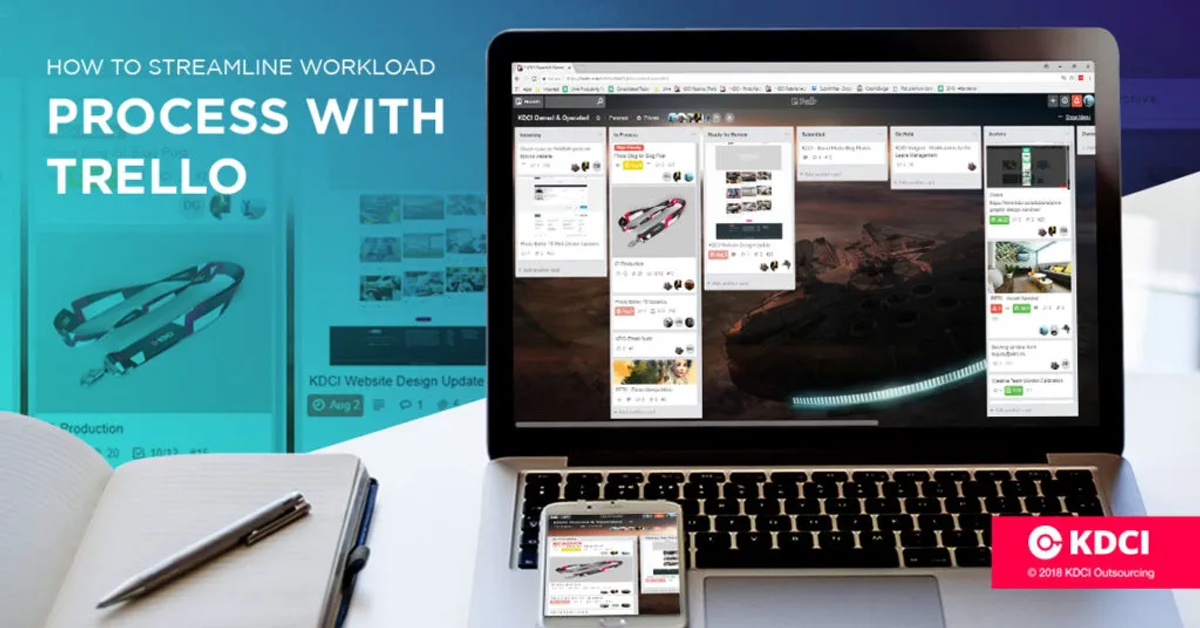
Here at KDCI, whenever the team gets a new project, a new card is created on the team’s Trello board. This makes it easy for everyone in the team to see at a glance all the new projects the company has. Things like client requests, deadlines, and team members assigned to tasks can all be easily viewed with a few clicks.
Trello is a great tool utilized fully by the KDCI team in the planning, creation, and implementation of our various projects. There may be a lot of other project management tools out on the market today, but not many can compare to the ease and flexibility that this tool offers, especially for the workplace.
Have you used Trello for your own workplace projects? We’d love to hear your experience.
Scale smarter with a Trello-trained team at KDCI.
If you’re looking to build an offshore team that can efficiently utilize Trello as a project management tool, look no further than KDCI Outsourcing.
As an offshore staffing solutions provider with a long-decade of leadership and experience in outsourcing, we offer outsourced and offshore staffing services at an affordable rate in customer support, human resources, product information management, web development, digital marketing, and accounting.
Let us help you improve your staffing levels and improve your overall work environment. Click the button below to get your FREE consultation with one of our outsourcing experts today!
Contact us to learn more.