Thank you! Your submission has been received!
Oops! Something went wrong while submitting the form.
Thank you! Your submission has been received!
Oops! Something went wrong while submitting the form.


Remote work can be a useful tool to encourage motivation and allow a productive working experience for your employees. That is if it isn’t forced into them like what’s happening during this pandemic.Therefore, to keep your employees productive as they work from home, or if you have teams offshore, you need a different approach. Luckily, you only need to do three things.Related: Working Remotely: How to Effectively Manage Remote Employees During The Pandemic
As an experienced outsourcing company, we’ve found that there are three essential things that you must do to keep your employees productive while working remotely. We practice these tips, and sometimes give them as advice for our clients who are new to having remote employees.

Ask employees about their working conditions. While setting a workspace or environment is an excellent way to have a productive working experience when working remotely, not all of your employees can have one.Therefore, it’s essential to ask them about their working conditions at home so that you can empathize well with their situation and help them adjust accordingly. That way, your employees will feel that you actually care about their wellbeing, which will motivate them to work.

While asking them about whether they are having a productive working experience while working at home, you have to follow it up with assisting them to have a plan. Give them advice on how they can be productive while working remotely, or maybe have them plan out their tasks for the week and give them notes.Having a project management tool can make planning easier towards a productive working experience for your employees. Most of these tools allow you to assign tasks to specific people so that you can monitor everyone’s progress. Some of the best tools you can use for project management are Trello, Asana, and Basecamp.

In knowing if your employees are having productive working experience during a remote work, you can use video conferencing to do so and try recreate social contact in group and individual interactions.Before your meetings, you can invest some time in brief, casual conversations. Let your team catch up on each other, share a laugh, or sympathize with one another.Next, establish individual interactions by spending 5 to 10 minutes with each of your employees. You can do this weekly or bi-weekly, whichever you think is best. Doing this on a Monday can help establish a working mood.Both can be time-consuming, however, they are critical in eliminating cabin fever or at least reduce feelings of isolation.Think of it this way; once you all get back to the office, you have established a good, healthier relationship with your teams.Must Read: 5 Side Effects of Working Remotely and How to Fix Them
Keeping your employees have a productive working experience during the remote work comes down to being good communicators. Everyone in your company must actively participate in communicating their expectations, challenges, and goals. That way, you can address hurdles as a team and get through the pandemic stronger, with better teamwork.


Today, numerous businesses have switched to remote work settings as a safety precaution against coronavirus. However, if your employees aren’t used to it, they might have difficulty adjusting to their new working environment.Related: Working Remotely: How to Effectively Manage Remote Employees During The Pandemic

In our experience, we’ve seen five common downsides of working remotely. We have come up with solutions to tackle them so that you don’t have to experience them as well.
Communication is one of the essential elements that make a business successful. However, it’s common to lack it when you don’t see each other in person.Unfortunately, a lack of communication can cause even more problems, like delayed work, misinformation, output errors, and many more. So, you have to go the extra mile when communicating with your remote employees.
Our team leaders and executives are tasked to check up on their members from time to time to see how they’re doing. In addition to quick daily check-ins, every week, or depending on what the leaders see appropriate, each team conducts video conferences to touch base and have task updates.Some of our clients who have dedicated outsource teams with KDCI have also opted to use project management tools like Trello, Asana, and Basecamp. This makes task monitoring easy, and it gives them the ease of quickly knowing what everyone is doing, what still needs to be done, and what has been done.
Inspiring passion is one of the many qualities that a business owner must have to encourage their employees to stay and work for them. However, building team spirit can be difficult now that almost all of your employees are working remotely.
KDCI leaders never forget to check up and empathize on the well-being of their teammates, especially during the quarantine period. We develop personal relationships with each other by having casual conversations from before a video conference starts, or sometimes joking around in the company-wide group chat.
Compared to the usual culture of working remotely, the spread of the pandemic has rendered everyone incapable of going around town almost entirely. This can affect the productivity of your employees, especially if they don’t have the technology and office setting in their home.However, not all home settings are conducive for work. Some of your employees might find it difficult to concentrate with everything going around the house, like family noise, taking care of and homeschooling the kids.
We are all going through lifestyle changes because of the quarantine, and that includes our sleeping schedules. Some of your employees will have reverted to their usual nocturnal lifestyle. In contrast, others may have maintained their usual morning routines.As a solution, we set production expectations in sprints and not the amount of time our employees spend on screen. This allows them to incorporate their unique preferences into their tasks, and let them be productive whatever time they choose, as long as they meet their deadlines.In terms of tech, some of our employees don’t have computers and stable internet connections. Hence, we provided them with equipment and wifi sticks to make working remotely sustainable for them.
Because of the quarantine, fixing issues with payment will not be as easy as running to the bank to check what happened to your payroll. You will have no other choice but to settle with online transactions, especially when you have offshore employees.
KDCI has rarely had issues with payment, but we address them with urgency and empathy, and we always ensure that every employee receives their salary on time. When problems arise, opt for finding better payment options, like cross-bank transactions, and online payment providers.If you are looking into hiring remote talent overseas, you may encounter issues with taxes and government requirements. The quickest, easiest fix is to partner with an outsourcing company. They will handle payroll, HR tasks, and everything your team needs to stay productive.I Want to Hire Remote Talent
Many security issues can arise when all of your employees are working remotely. You have to ensure that their home computers or laptops are secure and capable of handling the work. Otherwise, data leaks and data theft can arise.
KDCI handles data security daily, especially when our clients specifically asked for security agreements. Therefore, we guarantee the safety and security of their data by investing in data protection software like LastPass, VPNs, and updated antivirus software.Before going fully remote, we conducted a run-through of the capabilities of each of our employees to work from home. We ensured that their computers have all the necessary data protection requirements.If you want to learn more about our data security measures and how we protect your business, don’t hesitate to contact us and ask.Let's Talk

While there may still be other adverse effects of working remotely, there will always be a solution if you look for it. Here at KDCI, we help our clients stay afloat during this difficult time by assisting them in managing their remote teams and keeping their business running.Handling employees who are working remotely doesn’t have to be difficult if you have the right outsourcing partner to assist you.

Since the spread of the COVID-19 pandemic, numerous businesses have been struggling to maintain production and come up with their business continuity plan. While lockdowns and quarantines are necessary, you may be worried about the health and livelihood of your employees and your family.

Unlike brick-and-mortar stores, online businesses have a chance to continue operating amidst the pandemic with the help of a business continuity plan. As people are advised to stay at home, this has caused a surge in online shopping, as people took to going online for their needs instead of going out. Even Amazon saw this opportunity and had to hire 100,000 new employees, both part-time and full, just to keep up with the surge of online purchases. Here’s how you can do the same.
First step in your continuity plan is the assessment of your business situation. Gather your team — preferably online — check on them and make sure everyone is alright and well. If anyone is showing symptoms, urge them to self-isolate and follow safety measures, especially if they’ve been exposed to an infected person. After being a good leader, it’s time for business. Evaluate the current status of every part of your business. Determine the financial, operational, and physical standing of your company. Check your inventory, confirm that your supply chain is intact (i.e. with manufacturers, etc), coordinate with your shipping carriers to see the status of their operations. Make preparations to ensure that critical business operations are still being met. You should be prepared to make adjustments such as finding alternative suppliers and manufacturers, and other distribution channels as part of your business continuity plan.
In the midst of a crisis, you have to be keen on where your finances go so you have to determine your recovery priorities. Incorporating your finance management in your business continuity plan will help you minimize further losses and find how you will recover whatever you have already lost. Most experts predict that the economy will rebound later in the year, while others say that the market will bottom out long after the peak of the pandemic. Regardless, it’s important to have a plan of attack on how to keep your business afloat. If things come to a head and you’re considering wage cuts and staff layoffs but can’t afford to lose those positions, you can consider outsourcing to other countries for a cheaper option.
As the pandemic progresses, some of your teams may already be paralyzed or you might have to build another team for other areas of recovery. However, you may not currently have the capacity to expand or hire new people locally, so the best way to tackle this is through outsourcing, where you can take advantage of up to 60% savings on labor costs. As part of your business continuity plan, start determining the tasks that you need to outsource. Most likely, you may need more help with customer service emails, chat support, or social media, but you can also outsource tons of work, including:
Now that you’ve determined the tasks that you want to outsource, you need someone to do it to complete and make your business continuity plan materialize. The best, safest, and easiest way to outsource this is through an outsourcing company. Through them, you can guarantee security and quality of work, as they already have experience and an established structure to handle clients such as yourself. Before choosing an outsourcing company, research their expertise. It’s best to partner with an Ecommerce specialist, as they’re most likely to have all the services you need. Maximizing their services is less of a hassle since you only have to communicate with one company. Contact an Outsourcing Company Today
Before you sign a contract with an outsourcing company, communicate every detail of the work that needs to be done. Schedule a meeting and talk about the offshore team, the project, the quality of work, timelines, and deadlines. This is a crucial stage in your business continuity plan because your outsourcing partner needs to know your expectations. Sometimes, this is also where misunderstandings can arise, so you have to be clear with your terms and conditions. Outsourcing companies like ours will provide you with flexible terms and customized solutions. We want to know your goals and objectives, and with that, we recommend actions on how we’ll get you there. Before you read through the proceeding steps, you can contact us right now for inquiries and we’ll get to you as soon as possible.
Once you’ve settled with all the tasks you can outsource and already have someone to fulfill them, you can easily focus your business continuity plan on on-the-ground procedures like your order fulfillment process. Here are the points you need to review:
If you have a third-party shipping partner or fulfillment warehouse to assist you, it’s best if you communicate with them to know their strategies regarding the pandemic.
You can skip this step in your business continuity plan if you have a shipping partner since they will have separate terms or strategies for shipping. However, if you have a warehouse and a delivery team, you have to arrange safety measures for them in your business continuity plan, such as social distancing and enhanced cleaning and sanitation. Find ways on how to keep your employees safe; you can’t afford the coronavirus to spread in your company as you might be forced to stop operations entirely.
While executing your business continuity plan, schedule web conferences with your teams — both internal and outsourced — for updates or further strategies. Having scheduled web conferences is a good way to manage your teams if you have them working remotely. Moreover, it helps boost remote employee morale as conferences make them feel they’re part of the team.
There wouldn’t be a business to continue if your customers don’t know you’re still running. Therefore, you have to inform them that you’re still active and ready to serve them. In your business continuity plan, you can choose to write an article or press release that talks about your business continuity strategies or adjustments that will occur in light of the pandemic. Additionally, you can also create a social post or a simple banner in your mobile store app for a brief announcement. Here’s how we did ours: KDCI’s Full Production Gameplan Amidst COVID-19
Finally, to streamline your business continuity plan efforts as you move forward, you will need to set up progress reports, especially since almost everyone is working remotely. You can choose to have weekly, bi-weekly, or monthly reports, depending on the team and what you need from them. More often, our Ecommerce clients opt for weekly progress reports, since a lot of them outsource their data processing and management to us.

Through business continuity plan and management, your online store can survive this pandemic. As long as you put your priorities in line and have a good team to back you up, everything should run smoothly. If you’re looking for an outsourcing partner to help you build an effective business continuity plan, don’t hesitate to contact us! We’d be more than happy to help you keep your online store running during and after COVID-19.

Logos play an essential role in building a brand, especially for start-ups. Having a strong, striking logo and branding are integral in setting the stage for their entrance in today’s highly-saturated and competitive market.Coming up with a great logo and branding is not an easy task, however. It takes a combination of good eye for design and a great skillset to be able to execute it well.Today, we will share the creative design process that went into creating a logo and branding design for Haystak, an up-and-coming next generation index and search tool.The lead designer assigned to this case was Daniel Gutierrez, our Art Director, together with our 2 Senior Designers Bryan & Ryan.
Create the logo and branding style for the next evolution of index and search tool.
At the start of the creative process, we asked the client to provide us with a brief that we could use to start the logo and branding design for them. They provided us with their tagline, which was “Helping you find your needles”. They also provided us with the core concept of a magnifying glass with a needle in focus against a clump of hay in the background.Playing off those main concepts, we were able to brainstorm and come up with a couple of fresh and modern design ideas that would fit the direction that the client wanted to pursue in terms of branding.
We started off with the most obvious interpretation: a magnifying glass and a needle. However, instead of having the needle at the center, as in the initial brief, we chose to transform it into a handle. While it was simple in terms of execution, it was effective, and it produced a modern and sleek interpretation of the needle-and-haystack concept.
We approached the second concept with the intention of giving the idea of “hay” a more modern and unique feel. We thus came up with hay symbolized as a dotted spiral, with the needle at the center of it. This more abstract interpretation of hay was meant to reflect the concept of an endless void, and how data could be represented in that way as well.The general concept was also to stylize the needle as an arrow hitting a bullseye. This was meant to symbolize precision, a key characteristic of Haystak as a search and indexing tool for data.
In the third exploration of the logo and branding concept, we aimed for something clear and uncomplicated. During this time, the brand name evolved from Haystack to haystak - a sleeker and more memorable form perfect for branding. It was from these ideas that the concept of the needle merged with a single strand of hay was born.Combining the two concepts hit the mark, creating a simple yet unique logo that was very modern and sleek at the same time. More importantly, it was the version that the client enjoyed, and which they ultimately decided to go with for their branding initiative.
Creating a logo and branding design may not be an easy task, but it is one well worth investing in. With the right logo and the right branding, a brand can hit the ground running, armed with some of the best tools it can use to break into the marketplace effectively and successfully.This is exactly why it is crucial that in building your logo and branding strategy, you have the right team to do the right kind of work for you.KDCI is a Creative design outsourcing company in the Philippines and we specialize in building teams of professional logo and branding designers who do exceptional work for some of the best companies around the world.With our team of expert designers on board, you are always guaranteed top-notch, professional logo and branding design services every time.To learn more about what KDCI has to offer, contact us today

KDCI Outsourcing participated in the 11th International Innovation Summit (IIS) last November 12 at the Marriott Grand Ballroom. The one-day event was hosted by the IT and Business Process Association for the Philippines (IBPAP), the premier association for the IT-BPM industry in the Philippines. This year’s theme is “Next PHase: Leading the Charge, Withstanding Headwinds, Driving the Future of IT-BPM Today”.
IIS 2019 aims to address issues regarding the Philippines’ competitiveness in the global marketplace as one of the top investment destinations in the fields of animation, contact centers, game development, shared services, healthcare information management, and software development. The summit focused on policy building, technological innovations, and skills development for human capital as the three main driving forces that are essential to future-proofing the industry and achieving maximum growth and productivity.
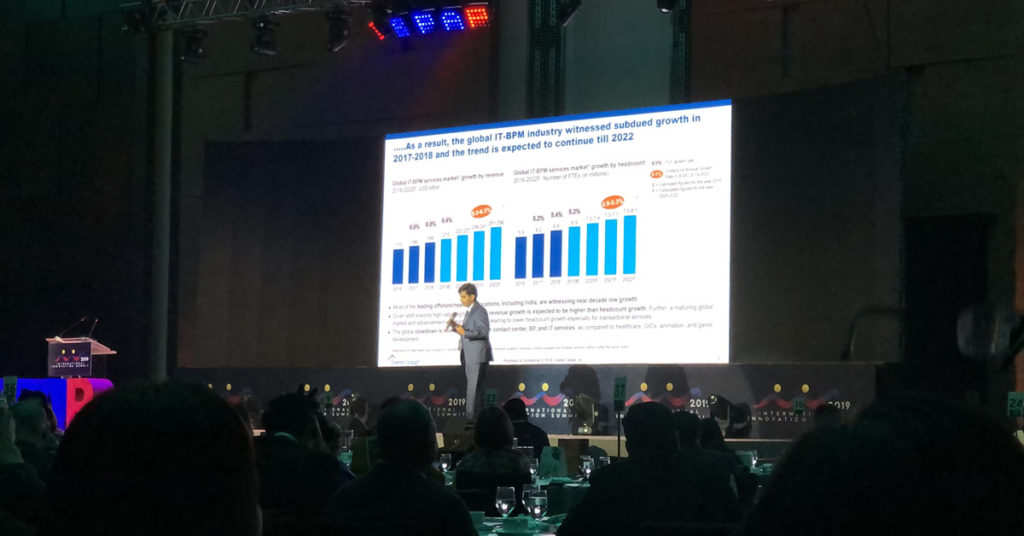
IIS 2019 brought together various industry leaders and entrepreneurs to speak about the Asian economic landscape, keeping up with digital transformations, and the importance of lifelong learning for the Filipino workforce. The event was attended by key stakeholders from the government, the academe, allied services, and business organizations within the industry -- fostering cooperation between the sectors towards a common goal. The day ended with a gala night where the participants had the chance to build mutually beneficial relationships and create new opportunities for collaboration.
KDCI Outsourcing firmly believes in the direction that IBPAP is steering the Philippine IT-BPM industry. We are fully aligned with their initiatives to continue the exponential growth of the industry despite the challenges presented by the local and international economic landscape. Through our own efforts and the continued guidance and support from organizations like IBPAP, we remain optimistic for the future by becoming better prepared for the next phase of the industry.

Developing a website takes a lot of creative juices as there are many design elements to consider — that is why clients need to make sure their web designers are up to the task. However, why aren’t designers doing the same thing? If clients need to ask questions to determine if they have the right web designer, web designers also need to ask questions if they want to figure out if the client is fit for them.Web designers would need to make sure that they don’t end up with an incompatible client by not doing their proper due diligence. It would also make them fully understand the project before they start moving a pixel. It doesn’t have to be a five-page survey; these are five web designer questions clients need to answer before a you start a web design project.

First web designer question is to ask about the current status of their business. An established business will likely already have an online presence of some sort. The client could already have a business profile, social media accounts, or even an existing website. If the website designer is going to be making a new website for an established business, they would have to do some rebranding. Everything from the logo to the overall theme would reflect in every corner of the internet. On the plus side, having an existing design gives the designer insight into the client’s mindset.For new businesses, web designers have a much more significant role in shaping the businesses’ future. While there is more freedom to get creative, it could also mean an extended time spent on the design process. Branding and logo designing must come before a website — along with the brand style guide for future creatives.
Second web designer question is to know whether the client has already established a business website. If the client already has an existing website, they need to answer an important question: “what is wrong with the current website?”. Determining the needs of the client is one of the first steps of a web design process. Web designers need to understand the elements they need to change. Is it the look and feel? The performance? User experience? They need to know what’s wrong first before they can make it right.
Third web designer question is identify what is the business you will be working on is about. Every business owner should be able to explain what their business is before starting a website. A simple, one-sentence elevator pitch to potential customers that clearly and concisely explains what the service or product is the foundation of every business framework. Web designers should understand this as everything they do is based on the client’s objectives for the website.
Fourth web designer question is to determine the client's goals for their website. Business owners should lay out the primary objectives before building the website. Does the client want to get more customers? Grow their social media following? Get more email subscribers? Most clients want to attract more customers, but it is the web designer’s job to create the visual funnel that guides the website visitor and transform them into a customer.
Fifth web designer question is to ask if the client needs to periodically change their website.. One of the essential factors in creating a website is knowing if it needs back-end access that clients can go to if they need to change something on the website. With the rising popularity of site builders and content management systems, clients expect to have this kind of feature installed for their website. Web designers need to determine if they need assistance from back-end developer for this. Depending on the tool and features, it could add more scope and expense to the project.
Web designers are talented people who pride themselves on creating beautiful and stunning websites. However, they need to work hand-in-hand with clients to communicate expectations and objectives of the website so, laying out web designer questions prior to working with clients is essential. Clients need to answer these web designer questions so that web designers have a clear understanding of the client’s vision of the website.Are you planning to have a website for your business? Looking for a revamp of your old website? We have the perfect team of highly skilled web designers capable of outlining the perfect website all while choosing the appropriate media and style to meet your design needs.

Everyone in this day and age is on the internet. Over the past few decades, we have a total of 1.7 billion registered websites and 50 percent of the whole population are internet users. As a business owner, it is important to keep a public website and even a private web application (if you need one) running for your business. And who do we have to thank for that? It’s our most trusted developers.Under the vast scope of web development, there are simply too many moving parts for any one person to handle. Generally, web developers are divided into two specific roles: front-end and back-end.Front-end developers are what you may see as the designers and layout experts for your business’ website. They are developers who mainly use languages like HTML, CSS, and Javascript as these can easily from the design of a webpage. They are the artists of the IT world and they make the interaction between humans and websites possible.Then there are the silent killers who code the functionalities and features of a website — the back-end developers. But what exactly are their roles and responsibilities? Let’s take a deeper look at what they do, what skills are vital for back-end development, and why do you need them in your business.
Back-end developers are a type of programmers who build the core computational functions of websites, software, or systems. They work hand-in-hand with front-end developers by providing the logic to communicate with the user interface. Aside from optimizing web applications for speed and efficiency, some of the infrastructures that revolve around back-end developers are:Server scripts – These are methods that allow a user to communicate with a web server to either send or request information. Server-side scripts also provide the web server a way to respond to actions and commands from the front-end or client-side.Databases – back-end developers are in-charge of creating data storage solutions and connecting them with the main website or web application. These databases also contain unique codes to perform mathematical and statistical calculations using the data stored in them.Application programming interface – APIs provide universal access to any kind of assets to and from other websites you choose to share or acquire. They seamlessly connect software, applications, databases, and third-party services together. They are often used to replace complex programming that was previously used to connect to other websites. A great example and implementation of API is a Facebook “like” button found on a blog post; it uses APIs that allow a website to show a functioning element from Facebook.

Just like front-end developers who have skills in navigating systems like React JavaScript (React JS), back-end developers require skills that revolve around coding languages, database-related queries, and software frameworks. These skills include:PHPIt is an OpenSource scripting language commonly used for web development. It is frequently used for blogs and is the primary language used for WordPress — the most popular content management system of 2019. It is widely used to communicate with the user’s database and request server content.SQLStructured Query Language is an industry-standard coding language used to communicate and manage a database. It performs functions like displaying, retrieving, updating, and even deleting data. It’s a must-learn language if you’re using a database to retrieve and acquire data.REST/SOAPRepresentational State Transfer (REST) and Simple Object Access Protocol (SOAP) are two web technologies that allow you to create your own API. They are two different styles that address the question of data transmission from different points of view. Back end developers must learn these architectures if they want to dive deeper into development.

If you don’t have a back-end developer to create and manage your business website, your customers won’t have a pleasant user experience. Having poor user experience means that customers will leave and find a website that works for them — losing you both sales and brand reputation. Also, you can have a jaw-dropping webpage design, but if the application doesn’t work, the whole thing will end up being a failure. You need to have the perfect combination of both front-end and back-end developers.Do you need the perfect website to cater to your customers’ needs? Our team of expert back-end developers understands how important it is to have a polished and efficiently working website. We’ll ensure that the root of your web applications is precisely functioning.

Congratulations! You’ve earned additional income from your business — an influx of extra cash will surely eliminate financial stress. While you deserve a reward for the hustle, It’s also a good idea to step back and plan how to spend it wisely.
If you’re looking for some tips on how to spend the extra money, look no further — here are five tips on how to allocate extra income.
If you’re already making extra money from your business, why not help it grow so that you could earn more? Spend some money to market your business, improve skills through seminars, or even upgrade equipment for better output. Anything that will help you attract more clients will certainly help you make more income.
Always keep your main financial goals in mind. Business expenses will always add up quickly, so make sure to set aside some of that extra income and invest in your main financial goals. Reviewing and adding the majority of your extra income as profit allows you to pay off your debts faster and fine-tune where your money goes. Additional money will aid you in anticipating and addressing future obstacles as well.

While it’s essential to plan and be smart about money, it’s also necessary to have a little bit of fun too. Set aside a small amount to treat yourself and show appreciation to your employees. Just don’t forget to take care of priorities first.
You don’t have to be a large corporation with a massive pool of money to contribute to society. You can give back through various ways like sponsoring a fundraiser and donating your skills. No matter how you decide to use your extra money to support your society, it will always leave a long-lasting impression on building a positive reputation.

Running a business full time will surely take up your time. With so many tasks on your plate, you’ll be overwhelmed. Why not turn your extra cash to valuable time and a helping hand? Outsourcing your business would free up your time and will allow you to focus on more important matters. A smart move would be to outsource basic tasks so that you can find other channels for your business to grow and earn more.
Most business owners tend to spend their extra income on paying debts or blowing everything on things they want versus things that they need. Both options leave an empty feeling — so it’s important that you learn to balance it all out. Spend your money wisely; allot majority of your extra funds towards business growth before taking a small percentage and keeping it to yourself – these are all key tips to ensure that you are truly spending your extra cash wisely.

582 million. That's the number of LinkedIn accounts vying for recruiter attention, and the best way to stand out is by optimizing your profile with a unique brand value. Here's an optimization guide to do it:
Always include your first, last, and middle name. Don’t be fancy by adding nicknames or funny titles to your LinkedIn profile like “Marketing Zombie” or “Social media buff.” Keep it simple.
One of the reasons why employers don’t bother to visit your LinkedIn profile is if they see you don’t have any pictures. Have a professional yet fun photo of you that will emulate your personality and expertise. Don’t be too stiff and corporate.
A must-have. Search for something that captures people’s attention. Make sure that you’ll look professional, smart, and on-brand with your profession. If you don’t know how to design one, you can pick from a royalty-free website like Unsplash and Pexels.
Arguably the most critical information in your LinkedIn profile. Be creative, concise, and include search keywords that are related to your expertise and profession.
Write it so that your target market and the audience will easily understand it. Show something of unique value that you can offer, be different. Be fun while also showing how good you are with your profession.
Use industry-specific keywords that revolves around your expertise and profession. Keep it short and formal as possible; highlight your skills and achievements.
Add projects that will highlight your abilities, knowledge, and improve your reputation. Think of it as a blog post that needs search optimization as it increases your chances to appear on the platform’s search queries.
Make it a habit to add more contacts to your LinkedIn profile. Remember to endorse them if they know their provided skill sets so they’ll be enticed to recommend you too. Who knows, maybe they can introduce you to their recruiters?
Do your best to make sure this meter is full because this determines how robust and searchable your profile is. As you add more relevant content to your profile, the strength meter rises. Don’t worry; it will show you what you can do to improve it.
The one thing that employers will surely take time to read. It’s similar to your resume and serves the same purpose. Include every company that you have worked for and include information about your obligations, accomplishments, and growth.
Explain your experience straight to the point; less is more in this section. When adding your current company, make sure to add a little more information about them.
Avoid using flashy buzzwords and remember to show results that you have achieved from your work rather than just telling. If you’re a great programmer, mention an award that you received and an exceptional metric that describes why you are one.
If you’re not a fresh grad and have tons of work experience, employers will probably ignore this one. It’s best to make sure that you always list your highest academic level. You can also include activities and recognitions that will boost your standing.
Some specific skill sets require certifications and licenses. If you have one, make sure to list them all down. This section in your LinkedIn profile shows that you’ve taken steps to improve your skills.
Aside from previous work, you should add case studies, research papers, blog posts, your product, and service that you or your company currently offers.
Always remember that when you add skills and expertise to your profile, you’re optimizing your search through those keywords while also creating opportunities for endorsements.
Add at least five skills related to your profession as users will receive 17 times more profile views than those who don’t.
This section explains to the recruiters why you are the perfect person for the position. Achievements you can include are publications, additional languages, projects, certifications, complete courses, honors, and awards.
The more groups you are in, and the more connections you have, the higher the chance that your LinkedIn profile will show up in search results.
The items that you add to this section should be relevant to yourself or your professions.
If you reveal that you’re passionate about something, you’ll inspire the people around you. So join groups and associate with the members of the community. Share your own personal thoughts and create a conversation. You’ll see that it will reach those who share the same interest and values
The most compelling candidates are those passionate about their field. Regularly update your LinkedIn profile to showcase your qualifications and enthusiasm, leveraging this optimization guide to elevate your online presence.


What started out as a few agents, has grown into an invaluable partnership with KDCI. With more than 40 team members, we are lucky enough to count as part of our Cedar Family. Thank you so much KDCI for making our Company better!

We have found KDCI to be a consistently reliable partner, always willing to ‘go the extra mile’ to ensure our valued customers receive the best possible service.

KDCI plays a very important role in our catalog and content operations. They are responsive, kind, and always willing to help us as much as possible. We have been working together for more than 4 years, and we hope our partnership will be even more fruitful in the future.

Having collaborated with KDCI.co for our creative needs, I can confidently attest to their unparalleled expertise and dedication. Their team consistently delivered innovative solutions that not only met, but often exceeded our expectations. Their professionalism and attention to detail are commendable.

KDCI were able to grow with us with any future requirements. We have a lot to do when it comes to our business, and everytime we come back, they're right there with us and able to deliver.

KDCI's team has been instrumental in helping us not only modernize our platforms but also increase the experiences for the customer, and to deliver on the tsunami of content that came their way.

We had a lot of difficulty finding qualified talent in the United States. Honestly, I don't think we had thought about outsourcing at all as a potential option, but we were very open to it once we heard about it. We love our KDCI team. They're just like a regular part of our team, it's just that they're thousands of miles away.

It's been five years since we started working with KDCI, and it just keeps getting better and better. We've grown together and achieved a lot of shared success. Overall, they're incredibly professional yet fun to work with. We are incredibly happy to have found them.

We're so glad we partnered with KDCI to develop a unique platform that delivers personalized customer experiences without compromising functionality or security. It was an amazing experience, I won't hesitate to start another project with them again.