Thank you! Your submission has been received!
Oops! Something went wrong while submitting the form.
Thank you! Your submission has been received!
Oops! Something went wrong while submitting the form.


Ecommerce tools simplify and automate tasks needed to start and run an online business. Whether you’re starting from scratch or expanding your brick-and-mortar to the digital scene, these tools will help maximize time and complete your online store sooner.In this article, we’ll list down and explain all the best Ecommerce tools you need for a domain name, Ecommerce platforms, product management, customer support, marketing, and graphic design.
A domain name is the identity or name of your website that serves as the door your customers use to enter your online store.If you already have a physical store, you can simply use your business name. However, sometimes the domain may have already been used by someone else. You will need to play around your business name or use a domain name generator to help you out.
GoDaddy is a domain name registration and web hosting service provider. It is one of the most popular web hosting companies, with over 18 million users.One of their online tools is a domain name generator that lets you choose based on keywords related to your business. After choosing the keywords, they will populate all the possible domain names, availability, and price.Check out GoDaddy’s domain name generator here.
Name Mesh is a smart domain name suggestion tool that lets you find available names depending on keywords, web hosting, and Top Level Domain or TLD (e.g. “.com,” “.net,” “.co,” etc.)What’s unique about this tool is that they sort names based on different factors like Common, New, Short, Extra, Similar, SEO, Fun, and Mix. These factors give you more options and can help you choose which one easily.Find your domain name with Name Mesh here.
Lean Domain Search is a website that allows you to search for domain names based on keywords you choose. However, they only check “.com” TLD, because they believe that nontechnical people will have “.com” at the top of their head for websites.After choosing a keyword, they almost instantly populate all possible domains. You can sort them based on popularity, length, or alphabetical order. Once you’ve found the name you want, they let you register directly through WordPress or Bluehost.Try out Lean Domain Search here.
Ecommerce platforms are Ecommerce tools that let you create and manage your website, manage products, streamline marketing efforts, and conduct sales operations. Choosing a platform is crucial as it can affect the efficiency and profitability of your business.Here are the top three Ecommerce platforms you can choose:
Shopify is one of the easiest platforms to use, making it great for startups and small businesses. It provides a wide selection of website designs and applications that can help boost your marketing and sales efforts.One disadvantage of using Shopify is that they charge a transaction fee on top of payment gateway fees. That is unless you use Shopify Payments, which isn’t available everywhere.Check out our blog if you want to learn more about how Shopify works and its pricing.
If you’re looking for customizability, Magento is a great Ecommerce platform to use. You can choose the free Open Source for some of the most basic functionalities or Magento Commerce for powerful capabilities.However, the biggest downside of Magento is it’s complicated to use if you don’t know how to code. Plus, they don’t have customer support. Although, you can outsource a Magento developer to help so that you’ll have someone to apply all the features and functionalities you want.
WooCommerce is an Ecommerce tool that allows you to turn a WordPress website into an online store. It’s highly customizable, and the best thing about it is it’s free. However, you will have to pay for additional features and themes.Although, like Magento, WooCommerce also requires knowledge about coding or website development. Because it’s also self-hosted, you have to perform maintenance and updates on your own. Luckily, it’s easy to outsource this to a WooCommerce developer.
Regardless of the number of products you’re going to sell, product management requires Ecommerce tools that can help streamline your process.Product management tools help you organize your current products, find potential areas for development, forecast inventory, and more. Here are three must-have product management Ecommerce tools:
Akeneo boasts a user-friendly and highly customizable system that can quickly measure product data and provide improvement suggestions. On top of that, Akeneo PIM is an open-source software, making it practically free.They also have an annual subscription for their enterprise edition if you want more features and cloud distribution. However, their prices are on a quote basis, so visit their website for more info.Here's a preview of viewing and searching products on Akeneo:https://www.youtube.com/watch?v=ekMTmTPptlc
Salsify is one of the most feature-rich product management Ecommerce tools you can use. It can simplify processes through fast data imports from multiple data domains paired with a drag-and-drop UI. Learn more about Salsify’s PIM here.As for pricing, Salsify is also on a quote basis that will probably vary based on the size of your business. Check out their pricing page for more information.Here's a preview of Salsify's dashboard:https://www.youtube.com/watch?v=NwolHbdvSps
inFlow is a powerful inventory management software that lets you track sales, manage products, review reports, and restock on time. You can install their software on your desktop or use their cloud application. Find out more about inFlow Inventory’s features here.inFlow Inventory has three pricing models: Light ($71/month, up to 100 monthly orders), Standard ($179/month, up to 1000 monthly orders), and Plus ($359/month, up to 5000 monthly orders). See the breakdown of each model on their pricing page.Here's a quick video about navigating inFlow:https://www.youtube.com/watch?v=JgqxPwO1RGQ
An Ecommerce business has a broader range of customer support channels compared to traditional customer service methods. There’s email, live chat, voice, omnichannel, and more.If you want to keep your customers satisfied, you have to be on every channel your customers want you to be. With Ecommerce tools for customer support, you can cover multiple channels and customers at once.
Zendesk is a support and sales software that features a help desk that can be customized specifically for what you need. It can handle multi-channel communication, including live chat and email. However, their email communications platform can be overwhelming with all the information on the page.They offer three pricing models: Support (from $5 per agent per month), Support Suite (from $89 per agent per month, and Custom-built (for personalized pricing). You can check out their pricing page to know more about the features included in each model.
HelpScout is the best Ecommerce tool for customer service when it comes to nurturing existing customers.With their Customer Management feature, you can find, sort, and manage all the customers you’ve identified. They also offer live chat, in-app messaging, and smooth integration with other Ecommerce tools you already have.They have three pricing models, which can be paid annually or monthly:
Find out more about the inclusions of each plan on their website. Here's a product demo of HelpScout's help desk:https://www.youtube.com/watch?v=zqifFwyGvoQ
SalesForce Essentials is a powerful customer service Ecommerce tool that features multi-channel support, including email, chat, phone, social, and self-service help. The platform is doesn’t overwhelm you with data and is easy to use. However, they don’t offer custom plans.You get all of their features for $300 billed annually (comes down to $25 per user per month) or $35 per user billed monthly.Check out this quick overview of SalesForce's platform:https://www.youtube.com/watch?v=zxO49kFkl0Q
Ecommerce marketing is more extensive than traditional marketing. Therefore, you will need numerous Ecommerce tools to help you handle each marketing strategy. Some of the main marketing methods include email, social media, pay-per-click, SEO, and content marketing.
Email marketing stands as the most budget-friendly and effective marketing strategy for Ecommerce businesses. In choosing an email marketing tool, you need something that can do the following:
Mailchimp is one of the most user-friendly email marketing tools available. Their email editor is pretty straightforward and doesn’t overwhelm you with too many features.They have a free subscription for small subscriber lists, but you will have to switch to a paid version once your list grows more than 2,000 subs. Unfortunately, their paid subscription is a bit pricey compared to other email marketing tools, and their automation capabilities are limited.Their pricing models are: Essentials (starts at $15/month), Standard (starts at $25/month), and Premium (starts at $420/month). Get the breakdown of each subscription on their pricing page.
Sender is one of the best email marketing Ecommerce tools for creating automated campaigns, without breaking the bank. It can easily integrate with Ecommerce platforms so you can streamline your email marketing and transaction process.This Ecommerce tool is free for up to 2,500 subs and 15,000 emails per month. As for their paid subscriptions, you can choose a monthly plan or pay for prepaid credits. The monthly plan charges depending on the number of subs, while prepaid credits charge per email.Their pricing varies greatly, but it ranges from 9€ to 990€ ($10.07 to $1107.99, conversions may vary). You can visit their pricing page for more information.
OptinMonster is a lead generation Ecommerce tool that can be used to grow your email list through advanced targeting and automation. It can personalize your opt-in messaging and design based on a user’s behavior so that you can have higher conversion rates.While it isn’t exactly an email sender tool, it has the lead generation, automation, and targeting capabilities that can’t be found in other email marketing tools.Their pricing models are annual subscriptions: Basic ($108/year), Plus ($228/year), Pro ($348/year), and Growth ($588/year). Find out more about the inclusions of each plan here.
Growing your social media requires a lot of repetition and content curation. With social media marketing tools, you can organize, create, and schedule your social media campaigns. On top of that, they allow you to measure the effectiveness of each campaign.Here, we will give you the best Ecommerce tools for data aggregation, social media content creation, and graphic post creation.
Hootsuite is a platform that gathers data from over 35 social media networks to easily publish, monitor, and analyze campaigns. One of its best features is its ability to create and manage paid social campaigns to see all data in one place.They have four pricing models, which are: Professional ($19/month), Team ($99/month), Business ($599/month), and Enterprise (custom pricing). Check out their pricing page for more info.Here's a quick tour of the HootSuite dashboard:https://www.youtube.com/watch?v=WVFNmBWAjC4
Coming up with recurring or trending content can be difficult if you don’t know where to look. BuzzSumo answers this problem by giving you content insights to help you come up with ideas, create timely content, monitor performance, and find relevant influencers.You can get BuzzSumo in four pricing models: Pro ($99/month or $948/year), Plus ($179/month or $1668/year), Large ($299/month or $2868/year), and Enterprise (custom pricing, starts at $499/month). See the breakdown of each plan here.
Some social media campaigns require minimal graphic design skills, and Canva is the best Ecommerce tool for that. It lets you design numerous marketing assets like social posts, flyers, brochures, and a whole lot more. Best of all, you can get a long way with its free subscription.However, if you want more customization, they have two more pricing models: Pro ($12.95/month or $119.4/year) and Enterprise ($360/year, or contact their sales team for custom pricing). Find out more about the features included in each plan here.
Some social media campaigns require minimal graphic design skills, and Canva is the best Ecommerce tool for that. It lets you design numerous marketing assets like social posts, flyers, brochures, and a whole lot more. Best of all, you can get a long way with its free subscription.However, if you want more customization, they have two more pricing models: Pro ($12.95/month or $119.4/year) and Enterprise ($360/year, or contact their sales team for custom pricing). Find out more about the features included in each plan here.
Ahrefs is a complete set of SEO tools that let you optimize your website, analyze competitors, research great keywords, explore top-performing content, and track your ranking. On top of that, they have extensive content about SEO on their website and Youtube channel, which is excellent for new businesses.They have four pricing models: Lite ($99/month or $990/year), Standard ($179/month or $1,790/year), Advanced ($399/month or $3990/year), and Agency ($999/month or $9,990/year). Check out their pricing page for more info about inclusions.
In a nutshell, Google Analytics helps you determine what’s wrong and what’s working on your website by providing real-time data. With this tool, you can maximize ad spend, analyze visitor behavior, and optimize pages for better user experience and SEO. Best of all, it’s free.However, if you’re not into analyzing a bunch of numbers, graphs, and other data, Google Analytics can be extremely overwhelming. It prioritizes functionality over user-friendliness, as it immediately shows you an overview of your site data as soon as you open it.
Search Console is another Google web tool that measures your website traffic and performance. It also lets you disavow or deny bad links, which is essential for healthy link building. Search Console also shows you the keywords each page on your website is ranking for, making it easy to target and optimize.Although, like Google Analytics, Search Console also shows an overwhelming amount of data. It’s also limited to only showing if your page is indexed in Google, but it doesn’t give you recommendations to improve.
Graphic design is essential to attract visitors and provide excellent customer experience through your Ecommerce website. On top of that, it’s a graphic designer’s responsibility to create a design that will entice your customers to shop.In Ecommerce, graphic design covers all aspects of the business that needs design or photo editing, including email design, landing page design, website design, product photo editing, and more. Here are the top three tools necessary for graphic design.
One of the most popular design tools, Photoshop can handle photo editing, compositing, digital painting, graphic design, and animation. All of these features are necessary for Ecommerce, because almost all of your assets need to have imagery to be effective.If you already have a background in using Photoshop, then you can probably fit designing your website into your schedule. Otherwise, you’re going to need to outsource a graphic designer. Because studying Photoshop from scratch will slow down your entire operations.Adobe Photoshop has three payment models: Annual plan paid monthly ($20.99), annual plan paid yearly ($239.88), and monthly plan ($31.49).
Another essential Ecommerce design tool, InDesign lets you create graphics for print and digital media. It’s great for creating typography, ebooks, digital magazines, interactive PDFs, brochures, catalogs, and more.Just like Photoshop, however, it requires you to have an existing skill in graphic design to maximize all its features. Plans and pricing are also the same as Photoshop.If you want to find the best value, you can check out their Creative Cloud Plans and Pricing page for bundles.
Shakr is a video editing tool that helps you create all types of video assets for your marketing strategies. It boasts a drag-and-drop video editing feature that allows you to create more videos faster, without sacrificing quality.Their prices start at $200, which is their basic plan. However, for more complex plans, you will have to ask for a quote. Visit their pricing page to find out more about Shakr’s features.
It can be difficult to choose from thousands of Ecommerce tool options. So hopefully, this list helped you find what you need. At the end of the day, the key is to keep your customers in mind when choosing Ecommerce tools, and you’ll always choose the right ones.All of the Ecommerce tools mentioned in this article are only some of what we use here at KDCI Outsourcing. To give you the best quality of service in design, marketing, customer service, and more — we need top-of-the-line Ecommerce tools.If you want to learn more about how we can help you start and grow your Ecommerce business, visit our Ecommerce Outsourcing page. For more questions, click or tap the button below.Contact Us


Our current situation has generated a whole mix of emotions and related physical symptoms: stress, panic, sadness, sleep problems, and short periods of isolation within days. Practicing various self-care methods is just one of the ways we can do to cope with potential emotional and mental issues.
We often wake up after a night’s sleep dehydrated, which can cause us to feel sluggish the whole day. To start the day in a good mood, drink a glass of water as soon as you wake up.
Self-care doesn’t have to be expensive and fancy. Most of the time, self-care comes in just putting your phone away and sitting with your own thoughts for five minutes. Always remember that it is important to take time to breathe.
It doesn’t have to be a high-intensity workout. It could be just getting up off your bed or couch to get lunch or to take a stroll in the park. It is as good for your mental health as it is for your physical health. You can take three 10-minute strolls if you can’t do it all at once.
Always keep in mind that it is important to recognize our accomplishments at the end of the day. Yes, we may have a lot of items in our to-do list, but no matter how small it is (even just getting up in the morning and surviving the day is accomplishment enough), you deserve a pat on the back.
We are in a situation where we are faced with uncertainties. This crisis brought a lot of negative impacts on our well-being and with that, always remember to be kind to yourself. We are in a crisis; it’s okay if you’re not productive as the situation is hard enough for everybody.

With the ongoing difficulties around the world, remember to put yourself first with these self-care methods.If you're experiencing a decline in mental health, don't hesitate to reach out to your family, friends, or co-workers. Together, you can support each other during these uncertain times.

Meetings have become an essential part of business continuity. As professionals, every leader and employee must follow virtual meeting etiquette to maintain the best online experience for the whole team. Here are 5 key things you should remember.
Treat the meeting as if you’re doing it in the office. Be mindful of everyone’s schedules and try to join the meeting at least five minutes early. This makes it easier to start the meeting promptly and to stick to the allotted time.
Before you join the meeting, make sure all systems are secure -- check that your mic, audio, camera, and internet connection are working properly. Have mobile data ready in case your internet connection fails. You want the meeting to go smoothly and without any interruptions.
Always be camera-ready, even if your meeting isn’t specified to be a video conference. Make sure your background is work-appropriate, and maintain a professional appearance in both attire and in posture. This also applies to your desktop environment, especially if you’re going to be sharing your screen.
With everyone staying at home these days, your house can get pretty noisy unless you’re living alone. Muting your microphone when you’re not talking allows everyone to listen to the speaker without any unwanted background noise.
It may be tempting to do other things like check your inbox or even continue with your work, but don’t do it! Be present for the whole meeting. You might miss out on important points and lose your opportunity to give input and ask questions.Must Read: 10 Tips on How to Be Productive During Quarantine

Working from home can make it difficult to separate your home self from your work self. While virtual meeting platforms can help your experience, being professional yourself can help you adjust better as you act as if you never left the office.

Living in a tropical country has conditioned us to deal with heat. Every time summer rolls around, we expect to beat the season like we always do. But every year, summer hits never-before-reached heat indexes and gets even hotter than the year before.
Working from home has removed us from the comfortable air conditioning of our offices, and having one at home would mean higher electricity bills.So, to help you manage the heat at home and save electricity at the same time, here are 10 things you can do:

Drinking lots of water sounds like the best way to get hydrated. Take it up a notch by adding lemon wedges or squeezing lemon juice into your glass of water for additional benefits like vitamin C, weight control, better skin quality, and kidney stones prevention.

Research shows that caffeine has mild diuretic effects, which can drive your body to produce a higher amount of urine and contribute to dehydration. But don't worry, coffee lovers -- if the caffeine temptation is too strong to resist, you can still have your favorite cup of coffee as long as you drink it moderately.

A spike in your body temperature will only make the heat feel worse. Prevent this by limiting your consumption of foods that take longer to digest. The more you eat, the more heat that your body will produce, so have smaller food portions to avoid slowing down your digestion.

A variety of cold foods available in the market comes with summer. With the quarantine still in place, you can resort to DIY creations that can cool you down. With the right ingredients and kitchen tools, go local and international with your dishes, from halo-halo, mais con yelo, and sago't gulaman to dalgona coffee, flavored milk tea, and fruit smoothies.

Here's a life hack to easily cool down -- your body's cooling points. Your neck and wrists are the most well-known. Aside from these, the insides of your elbows, knees, and ankles and the top of your feet are other common cooling points. Once you've determined the most convenient place for you, apply a towel-wrapped ice to this area to quickly and effectively cool down.

It might be hard to accept that even when staying inside the house, anyone is still susceptible to heat-related illnesses and emergencies such as heat stroke, heat rash, heat cramps, and heat exhaustion. Just in case all else fails, get one step ahead of them, and have the ability to recognize their symptoms. And if the worst occurs -- knock on wood -- you'll know what to do to best help the victim.

As much as you want to switch on your aircon all day every day, mounting electricity bills would be a slap of reality to that fantasy. It's a good thing that creativity can help you through tough times. If you have ice and a spare fan, you can already start your own aircon projects with other items at home, such as styrofoam and plastic soda bottles.

Most of us have a skincare routine that we stick to day and night. To add a twist to your regular routine, keep your skincare products inside the refrigerator. Once it's time to use your skincare products, experience a refreshing sensation and a soothing effect when applying your lotions, moisturizers, and creams.

It's easy to let the quarantine and the weather turn into excuses to stop exercising. But just because it's hot doesn't mean that you can't do your regular workouts anymore. Exercise early in the morning or later in the evening -- the weather during these hours is a little cooler. Plus, with thousands of fitness videos online, you can use them as a guide when doing your workouts at home.

Even pets are affected by this seemingly never-ending heat. Keep an eye for symptoms of heatstroke, which can go from rapid panting and drooling to seizures and coma. Prevention is still better than cure, and you can save your fur babies from this by giving them a well-ventilated space, always providing them fresh drinking water, and avoiding exercises under hot weather.
The overwhelming summer heat has caused many discomforts since the start of the season. These tips can help relieve the uneasiness brought by the hot weather.Are you working from home? Check out these tips to stay productive.

Hiring full-time Ecommerce specialists with the right experience for your business' Ecommerce service that you can leverage to succeed is expensive, and isn't always financially feasible. Ecommerce services come in as essentially outsourcing companies with the same expertise but without the pricey bit of hiring in-house.
Unlike brick-and-mortar stores, Ecommerce requires a specific set of skills for particular tasks that you can’t do alone. And as your competitors move to digital, letting an Ecommerce expert help you can fast-forward your transition to digital without mistakes. Here are the following Ecommerce services that you can outsource.

First on the list of Ecommerce services that you can outsource is website and graphic design operations. A journal article published in the Management Information Systems Quarterly focused on Exploring Human Images in Website Design: A Multi-Method Approach. In the study, they found that the visual design of Ecommerce websites can enhance not only aesthetics but also the emotional appeal of the visitors. As a result, website visitors were more likely to trust a site with good design. Meanwhile, according to Formstack, 57% of users will not recommend a business that doesn’t have a good website design. This can hurt your business because, consequently, recommendations can increase sales by 29%, according to a report by Amazon. Graphic Design, on the other hand, is an element of Website Design that also covers other things like:
Luckily, this type of work can be outsourced to a provider of Ecommerce services, so you don’t have to do it yourself. As an experienced Ecommerce service provider, we know how to incorporate your vision of your brand with what your customers like to see in a website — be it on their computers or smartphones. Arby's, for example, trusted us with developing a custom platform for improved customer experience. With our experience in UI/UX design, we helped them grow their brand with a design that their customers love. See more of the design we did for them in Arby's Case Study.

An Ecommerce website is capable of handling online transactions to make it easy for customers to choose and buy products or ecommerce services from a business. Unfortunately, if you try to create a website alone using drag-and-drop platforms, you don’t have anyone to help you if any errors occur. Your customers make transactions on your website, and if they can’t use your website, you don’t make money. That’s where the assistance of Ecommerce services come in. With their help, you can have your live website sooner, have quicker bug fixes, and new custom features can be implemented faster. The KDCI Ecommerce Website Development and Maintenance team specializes in Ecommerce platforms and Ecommerce services. Aside from that, we can also create custom websites if you want more unique capabilities that can be difficult to achieve using standard platforms. We can even help you out if you don't know what to build your site on, or if you want to migrate to a new platform. Our expertise are in place to be able to guide you based on what your business needs.

Third on the Ecommerce services that your business can outsource is product information management. One of the most critical rules of selling online is providing your customers with product descriptions that will compel them to buy your product. At the same time, these descriptions must be SEO friendly so that you can drive sales to your product pages. Be it Amazon, Shopify, Magento, or any online selling platform you use, our Product Information Management (PIM) team can help you out. We can cover all data that concern your products, which includes:
With our experience in Ecommerce services, we can speed up the production of your product data so you can start selling as soon as possible. No matter what niche your business (or potential business) is, we can handle it. I need help with Product Information Management

Every online business needs content for everything. Be it for social media, advertisements, or blogs — content is everywhere. Fourth Ecommerce services that you can leverage and outsource is content creation operations. Good quality content is capable of targeting your customers’ pain points and selling your products or services in such a way that it answers their needs. Hiring Ecommerce services means you get good quality content. This, in turn, helps improve your website’s SEO (Search Engine Optimization) performance. Good SEO will make your website appear on the first page whenever someone searches for your product or service, making them more likely to buy from you. Therefore, SEO Content Creation is vital for Ecommerce because it creates a better online presence for your business. It uses a strategic, data-driven approach to ensure that all content you put out targets your specific goals, from attracting customers to making a sale.

Order processing is a part of an Ecommerce services and sales process that deals with responding and fulfilling orders. It has a direct impact on customer experience and satisfaction, which ultimately translates to your sales. Good thing, there are a lot of third-party fulfillment services that can help you handle this load. They can take care of order validation, query resolution, status check, and cancellation management, while you focus on running your business. Outsourcing order processing means you don’t have to train an entire team of fulfillment staff and worry about attrition. This can reduce your operational and management costs by up to 40%, which you can invest in other parts of your business. Some of the best order processing companies are ShipBob, ShipMonk, and Rakuten Super Logistics.

Digital Marketing as one of the Ecommerce services utilizes technology and online channels to advertise, promote, and grow your brand. Without it, it can be almost impossible to run an online business. However, Digital Marketing is not a one-size-fits-all strategy. Every business is different, and therefore each must have a unique digital strategy. Hiring an Ecommerce services company can help ensure that your strategies work for your business. They can help you with numerous types of Digital Marketing, which includes:
More and more businesses are building their online presence. Therefore, investing in Digital Marketing for your Ecommerce services has become more important if you want your business to get on top of your competitors. Help me build my online presence

An online business’ customer service is different from the traditional in-store or voice customer service in terms of the number of channels you can use. Ecommerce Customer Support can still include voice support, but you can also have chat, email, and omnichannel. Each of these support types requires skills that can be difficult and more expensive to hire locally. Because as customer inquiries pile up, you’ll need more people to answer their questions on the dot. This means additional expenses in computers, technical support, and office space. Hiring Ecommerce services for customer support can help you cut costs while improving customer experience. They can absorb the demands of 24/7 shifts, making your responses faster and more efficient.
Running a business is difficult if you try to do it alone. Luckily, there are numerous Ecommerce services out there that are waiting and quite eager to help you out. Not only will you build a good partnership with another business, but you can also increase your conversions and profit with the right Ecommerce service providers.

Logos play an essential role in building a brand, especially for start-ups. Having a strong, striking logo and branding are integral in setting the stage for their entrance in today’s highly-saturated and competitive market.Coming up with a great logo and branding is not an easy task, however. It takes a combination of good eye for design and a great skillset to be able to execute it well.Today, we will share the creative design process that went into creating a logo and branding design for Haystak, an up-and-coming next generation index and search tool.The lead designer assigned to this case was Daniel Gutierrez, our Art Director, together with our 2 Senior Designers Bryan & Ryan.
Create the logo and branding style for the next evolution of index and search tool.
At the start of the creative process, we asked the client to provide us with a brief that we could use to start the logo and branding design for them. They provided us with their tagline, which was “Helping you find your needles”. They also provided us with the core concept of a magnifying glass with a needle in focus against a clump of hay in the background.Playing off those main concepts, we were able to brainstorm and come up with a couple of fresh and modern design ideas that would fit the direction that the client wanted to pursue in terms of branding.
We started off with the most obvious interpretation: a magnifying glass and a needle. However, instead of having the needle at the center, as in the initial brief, we chose to transform it into a handle. While it was simple in terms of execution, it was effective, and it produced a modern and sleek interpretation of the needle-and-haystack concept.
We approached the second concept with the intention of giving the idea of “hay” a more modern and unique feel. We thus came up with hay symbolized as a dotted spiral, with the needle at the center of it. This more abstract interpretation of hay was meant to reflect the concept of an endless void, and how data could be represented in that way as well.The general concept was also to stylize the needle as an arrow hitting a bullseye. This was meant to symbolize precision, a key characteristic of Haystak as a search and indexing tool for data.
In the third exploration of the logo and branding concept, we aimed for something clear and uncomplicated. During this time, the brand name evolved from Haystack to haystak - a sleeker and more memorable form perfect for branding. It was from these ideas that the concept of the needle merged with a single strand of hay was born.Combining the two concepts hit the mark, creating a simple yet unique logo that was very modern and sleek at the same time. More importantly, it was the version that the client enjoyed, and which they ultimately decided to go with for their branding initiative.
Creating a logo and branding design may not be an easy task, but it is one well worth investing in. With the right logo and the right branding, a brand can hit the ground running, armed with some of the best tools it can use to break into the marketplace effectively and successfully.This is exactly why it is crucial that in building your logo and branding strategy, you have the right team to do the right kind of work for you.KDCI is a Creative design outsourcing company in the Philippines and we specialize in building teams of professional logo and branding designers who do exceptional work for some of the best companies around the world.With our team of expert designers on board, you are always guaranteed top-notch, professional logo and branding design services every time.To learn more about what KDCI has to offer, contact us today

KDCI Outsourcing participated in the 11th International Innovation Summit (IIS) last November 12 at the Marriott Grand Ballroom. The one-day event was hosted by the IT and Business Process Association for the Philippines (IBPAP), the premier association for the IT-BPM industry in the Philippines. This year’s theme is “Next PHase: Leading the Charge, Withstanding Headwinds, Driving the Future of IT-BPM Today”.
IIS 2019 aims to address issues regarding the Philippines’ competitiveness in the global marketplace as one of the top investment destinations in the fields of animation, contact centers, game development, shared services, healthcare information management, and software development. The summit focused on policy building, technological innovations, and skills development for human capital as the three main driving forces that are essential to future-proofing the industry and achieving maximum growth and productivity.
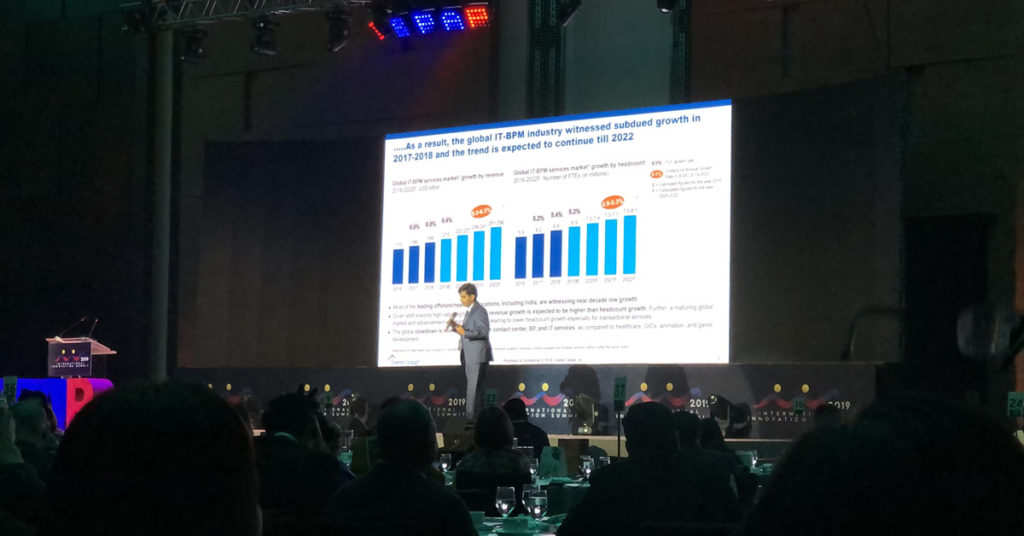
IIS 2019 brought together various industry leaders and entrepreneurs to speak about the Asian economic landscape, keeping up with digital transformations, and the importance of lifelong learning for the Filipino workforce. The event was attended by key stakeholders from the government, the academe, allied services, and business organizations within the industry -- fostering cooperation between the sectors towards a common goal. The day ended with a gala night where the participants had the chance to build mutually beneficial relationships and create new opportunities for collaboration.
KDCI Outsourcing firmly believes in the direction that IBPAP is steering the Philippine IT-BPM industry. We are fully aligned with their initiatives to continue the exponential growth of the industry despite the challenges presented by the local and international economic landscape. Through our own efforts and the continued guidance and support from organizations like IBPAP, we remain optimistic for the future by becoming better prepared for the next phase of the industry.

Developing a website takes a lot of creative juices as there are many design elements to consider — that is why clients need to make sure their web designers are up to the task. However, why aren’t designers doing the same thing? If clients need to ask questions to determine if they have the right web designer, web designers also need to ask questions if they want to figure out if the client is fit for them.Web designers would need to make sure that they don’t end up with an incompatible client by not doing their proper due diligence. It would also make them fully understand the project before they start moving a pixel. It doesn’t have to be a five-page survey; these are five web designer questions clients need to answer before a you start a web design project.

First web designer question is to ask about the current status of their business. An established business will likely already have an online presence of some sort. The client could already have a business profile, social media accounts, or even an existing website. If the website designer is going to be making a new website for an established business, they would have to do some rebranding. Everything from the logo to the overall theme would reflect in every corner of the internet. On the plus side, having an existing design gives the designer insight into the client’s mindset.For new businesses, web designers have a much more significant role in shaping the businesses’ future. While there is more freedom to get creative, it could also mean an extended time spent on the design process. Branding and logo designing must come before a website — along with the brand style guide for future creatives.
Second web designer question is to know whether the client has already established a business website. If the client already has an existing website, they need to answer an important question: “what is wrong with the current website?”. Determining the needs of the client is one of the first steps of a web design process. Web designers need to understand the elements they need to change. Is it the look and feel? The performance? User experience? They need to know what’s wrong first before they can make it right.
Third web designer question is identify what is the business you will be working on is about. Every business owner should be able to explain what their business is before starting a website. A simple, one-sentence elevator pitch to potential customers that clearly and concisely explains what the service or product is the foundation of every business framework. Web designers should understand this as everything they do is based on the client’s objectives for the website.
Fourth web designer question is to determine the client's goals for their website. Business owners should lay out the primary objectives before building the website. Does the client want to get more customers? Grow their social media following? Get more email subscribers? Most clients want to attract more customers, but it is the web designer’s job to create the visual funnel that guides the website visitor and transform them into a customer.
Fifth web designer question is to ask if the client needs to periodically change their website.. One of the essential factors in creating a website is knowing if it needs back-end access that clients can go to if they need to change something on the website. With the rising popularity of site builders and content management systems, clients expect to have this kind of feature installed for their website. Web designers need to determine if they need assistance from back-end developer for this. Depending on the tool and features, it could add more scope and expense to the project.
Web designers are talented people who pride themselves on creating beautiful and stunning websites. However, they need to work hand-in-hand with clients to communicate expectations and objectives of the website so, laying out web designer questions prior to working with clients is essential. Clients need to answer these web designer questions so that web designers have a clear understanding of the client’s vision of the website.Are you planning to have a website for your business? Looking for a revamp of your old website? We have the perfect team of highly skilled web designers capable of outlining the perfect website all while choosing the appropriate media and style to meet your design needs.

Everyone in this day and age is on the internet. Over the past few decades, we have a total of 1.7 billion registered websites and 50 percent of the whole population are internet users. As a business owner, it is important to keep a public website and even a private web application (if you need one) running for your business. And who do we have to thank for that? It’s our most trusted developers.Under the vast scope of web development, there are simply too many moving parts for any one person to handle. Generally, web developers are divided into two specific roles: front-end and back-end.Front-end developers are what you may see as the designers and layout experts for your business’ website. They are developers who mainly use languages like HTML, CSS, and Javascript as these can easily from the design of a webpage. They are the artists of the IT world and they make the interaction between humans and websites possible.Then there are the silent killers who code the functionalities and features of a website — the back-end developers. But what exactly are their roles and responsibilities? Let’s take a deeper look at what they do, what skills are vital for back-end development, and why do you need them in your business.
Back-end developers are a type of programmers who build the core computational functions of websites, software, or systems. They work hand-in-hand with front-end developers by providing the logic to communicate with the user interface. Aside from optimizing web applications for speed and efficiency, some of the infrastructures that revolve around back-end developers are:Server scripts – These are methods that allow a user to communicate with a web server to either send or request information. Server-side scripts also provide the web server a way to respond to actions and commands from the front-end or client-side.Databases – back-end developers are in-charge of creating data storage solutions and connecting them with the main website or web application. These databases also contain unique codes to perform mathematical and statistical calculations using the data stored in them.Application programming interface – APIs provide universal access to any kind of assets to and from other websites you choose to share or acquire. They seamlessly connect software, applications, databases, and third-party services together. They are often used to replace complex programming that was previously used to connect to other websites. A great example and implementation of API is a Facebook “like” button found on a blog post; it uses APIs that allow a website to show a functioning element from Facebook.

Just like front-end developers who have skills in navigating systems like React JavaScript (React JS), back-end developers require skills that revolve around coding languages, database-related queries, and software frameworks. These skills include:PHPIt is an OpenSource scripting language commonly used for web development. It is frequently used for blogs and is the primary language used for WordPress — the most popular content management system of 2019. It is widely used to communicate with the user’s database and request server content.SQLStructured Query Language is an industry-standard coding language used to communicate and manage a database. It performs functions like displaying, retrieving, updating, and even deleting data. It’s a must-learn language if you’re using a database to retrieve and acquire data.REST/SOAPRepresentational State Transfer (REST) and Simple Object Access Protocol (SOAP) are two web technologies that allow you to create your own API. They are two different styles that address the question of data transmission from different points of view. Back end developers must learn these architectures if they want to dive deeper into development.

If you don’t have a back-end developer to create and manage your business website, your customers won’t have a pleasant user experience. Having poor user experience means that customers will leave and find a website that works for them — losing you both sales and brand reputation. Also, you can have a jaw-dropping webpage design, but if the application doesn’t work, the whole thing will end up being a failure. You need to have the perfect combination of both front-end and back-end developers.Do you need the perfect website to cater to your customers’ needs? Our team of expert back-end developers understands how important it is to have a polished and efficiently working website. We’ll ensure that the root of your web applications is precisely functioning.


What started out as a few agents, has grown into an invaluable partnership with KDCI. With more than 40 team members, we are lucky enough to count as part of our Cedar Family. Thank you so much KDCI for making our Company better!

We have found KDCI to be a consistently reliable partner, always willing to ‘go the extra mile’ to ensure our valued customers receive the best possible service.

KDCI plays a very important role in our catalog and content operations. They are responsive, kind, and always willing to help us as much as possible. We have been working together for more than 4 years, and we hope our partnership will be even more fruitful in the future.

Having collaborated with KDCI.co for our creative needs, I can confidently attest to their unparalleled expertise and dedication. Their team consistently delivered innovative solutions that not only met, but often exceeded our expectations. Their professionalism and attention to detail are commendable.

KDCI were able to grow with us with any future requirements. We have a lot to do when it comes to our business, and everytime we come back, they're right there with us and able to deliver.

KDCI's team has been instrumental in helping us not only modernize our platforms but also increase the experiences for the customer, and to deliver on the tsunami of content that came their way.

We had a lot of difficulty finding qualified talent in the United States. Honestly, I don't think we had thought about outsourcing at all as a potential option, but we were very open to it once we heard about it. We love our KDCI team. They're just like a regular part of our team, it's just that they're thousands of miles away.

It's been five years since we started working with KDCI, and it just keeps getting better and better. We've grown together and achieved a lot of shared success. Overall, they're incredibly professional yet fun to work with. We are incredibly happy to have found them.

We're so glad we partnered with KDCI to develop a unique platform that delivers personalized customer experiences without compromising functionality or security. It was an amazing experience, I won't hesitate to start another project with them again.